Terminal UI guide
When stdout is a TTY and you’re not in CI or agent mode, layermix launches an Ink-based TUI. If you just want parallel-safe logs, that’s the linear mode described in CI and AI agents; this page is about the interactive version.
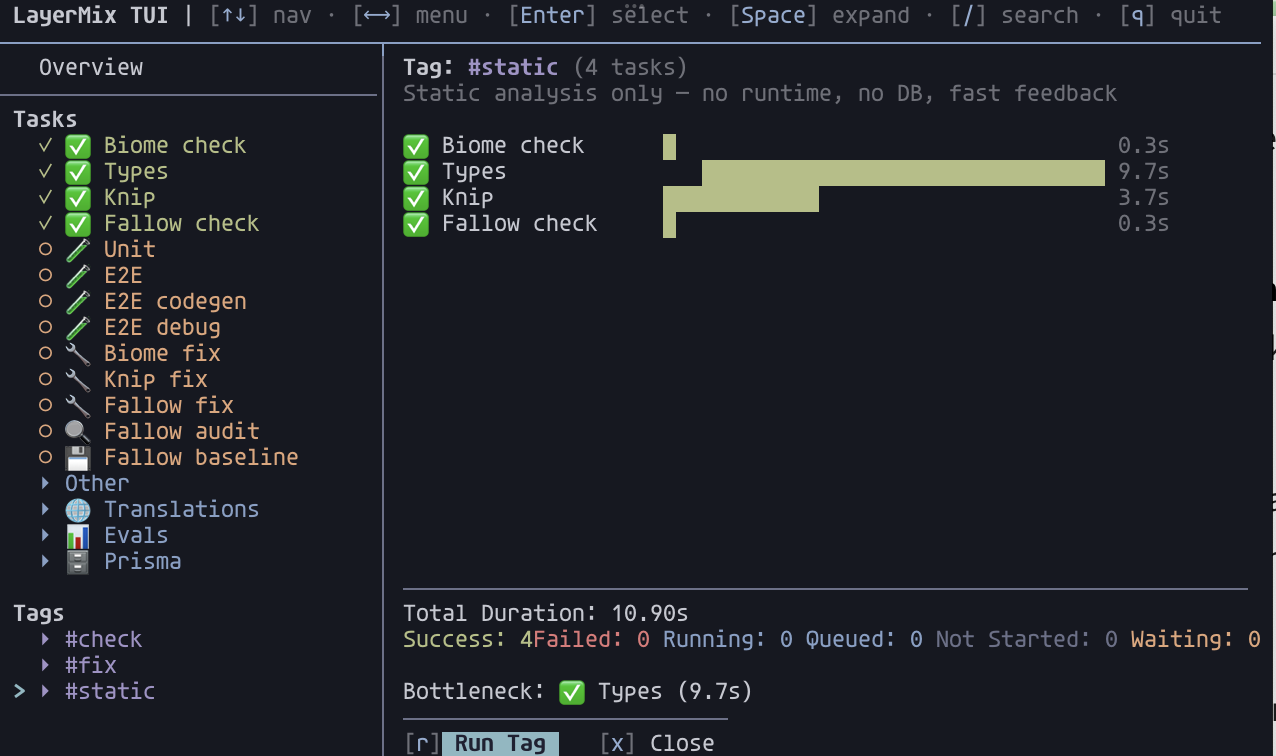
Layout
Top bar               keyboard hints

Overview row          aggregated status of everything scheduled

Tasks                 flat list of ungrouped tasks
  ▸ build             collapsible group (Space to expand)
  ▾ deploy            expanded group
    │ migrate
    │ push

Tags
  ▸ #test             collapsible tag (Space to expand)

Right pane            Overview / TaskDetail / TagDetail / GroupOverview
The sidebar is three stacked sections: the Overview row, the Tasks list, and the Tags list. Up / down cycles through all of them. Pressing Enter on a task queues it. Pressing Enter on a tag queues every task with that tag.
Keybindings
| Key | Context | Action |
|---|---|---|
↑ / ↓ / k / j |
Sidebar | Move selection |
Enter |
Task row | Open task detail |
Enter |
Tag row | Open tag detail (Run / Retry Failed) |
Enter |
Group row | Show scoped overview |
Space |
Group or tag row | Toggle expand / collapse |
/ |
Anywhere | Start task-id search |
Esc |
Search mode | Cancel search |
q / Ctrl+C |
Anywhere | Quit |
r |
Task detail | Run (ignores deps; opens picker if task has args) |
r |
Task detail, failure state | Retry with the last args |
r |
Tag detail | Run tag (re-runs even if completed) |
R |
Task detail | Run With Deps (re-runs the task plus any completed upstream) |
F |
Tag detail | Retry Failed (scoped to failed tasks in this tag and their downstream) |
K |
Task detail, running state | Kill the task (fails it, cascades skip downstream) |
c |
Task detail | Copy logs to clipboard |
x |
Any detail | Close detail view |
f |
Task detail | Toggle log fullscreen |
PgUp / PgDn, Ctrl+u/d, Ctrl+b/f |
Task detail | Scroll logs |
g / G |
Task detail | Jump to top / tail |
Menu navigation on task detail uses ← / → / h / l and Enter. The Rerun and Run menu options for args-aware tasks are activated from the menu, not a shortcut.
Status icons
| Icon | Colour | State |
|---|---|---|
○ |
yellow | Waiting. Not yet queued. |
● |
blue | Queued. Scheduled, waiting for a concurrency slot or upstream deps. |
| spinner | blue | Running. |
✓ |
green | Success. |
✗ |
red | Failure. |
- |
gray | Not started. An upstream dep failed, so this cascade-skipped. |
If you rapid-fire Run on multiple tasks, they stack up as blue ● while the current ones finish, so you can see exactly what’s queued.
Search
Press / and start typing. The Tasks list filters live, matching any substring of a task id or label. Non-matching groups and tags stay visible but collapse by default. If your query matches tasks inside a collapsed group or tag, that collapsible auto-expands so the hit is visible.
While a query is active, shortcuts like r, R, F, K are disabled: every keystroke feeds the query. Press Esc to exit search.
Re-running
Re-run semantics depend on which action you trigger.
r on a succeeded task runs just that one task again, ignoring whether upstream deps are up to date. Useful when you know inputs haven’t changed. If the task has args, the picker opens first.
r on a failed task replays the last args silently. Fastest iteration path when you’re fixing something.
R on a task runs the task plus any completed upstream deps, from the top. Useful for a fresh build from scratch. Hidden for tasks with no dependsOn (it would duplicate plain Run).
Rerun (menu option on a succeeded args-aware task) replays the last collected args without re-prompting. It’s the default-highlighted option after a green run.
Run (menu option on a failed args-aware task) re-opens the picker, so you can change inputs that caused the failure.
Tag detail has two of its own:
ron a tag runs every task with that tag, even if they already succeeded. Upstream deps outside the tag stay cached.Fon a tag resets only the currently-failed tasks in that tag (plus their downstream), then reruns them. Great for iterating on lint failures without re-running a long test suite that already passed.
The retry helpers also reset tasks downstream of a failure. So re-running isn’t just optimistic: anything that was cascade-skipped because of the failure gets a fresh shot too.